
Superhuman Mail review: the email app for web designers who hate their inbox
My inbox used to feel like a second job
Monday morning. You open your inbox. Client questions, project updates, “just checking in” emails, and seventeen things that somehow all feel urgent. Your soul quietly leaves your body.
I’m Emma Kate. I help graphic designers confidently build WordPress websites for clients, without code or overwhelm. And for years, email was the thing that was quietly overwhelming me.
Then I switched to Superhuman Mail. Three years later, I would buy it twice without hesitation.
What is Superhuman Mail?
Superhuman is a beautifully designed email client built for people who want to spend less time in their inbox. It sits on top of your existing Gmail or Outlook account and completely transforms how email feels to use.
Fast is the first thing you notice. Everything is instant: opening emails, searching, archiving, switching between accounts. There’s no lag, no loading spinners, no waiting.
Then you discover the keyboard shortcuts. Within a week you’ll feel like a hacker, moving through your inbox without touching your mouse. It sounds nerdy. It’s genuinely satisfying.
The features that actually change how you work
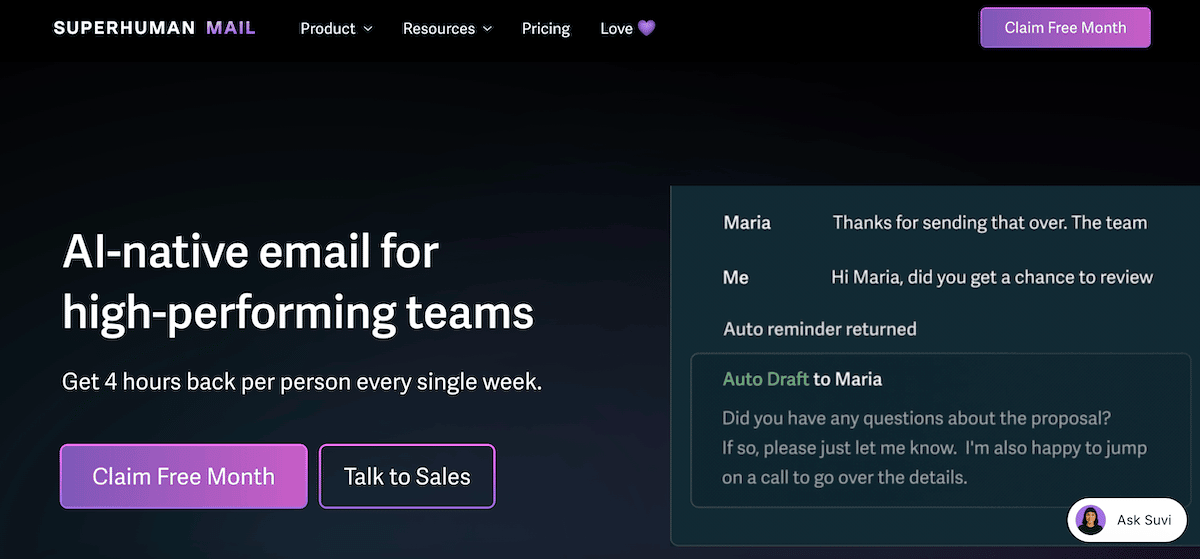
AI that drafts replies in your voice. This is the one. Superhuman’s AI reads the email thread and drafts a reply that sounds like you, using the context it already has. No tab-hopping to ChatGPT, no pasting email context into another window, no sounding generic. Your clients will think you finally hired a VA.
Email snooze and reminders. An email comes in that you can’t deal with right now. Snooze it to tomorrow morning, or next Monday, or the day before a deadline. It disappears from your inbox and comes back exactly when you need it. Nothing slips.
Read statuses. See when someone has opened your email. Useful for knowing whether to follow up or give it another day.
Splits. Your inbox is divided into categories so important client emails aren’t buried under newsletters and notifications.
Send later and undo send. Schedule emails to land at the right time, and catch mistakes before they matter.
As a web designer juggling clients, students, and a business, getting through my inbox in half the time means more hours for the work I actually love. And the occasional 3pm couch break.
For more tools that support a streamlined web design workflow, my useful tools page has the full list.
Does Superhuman actually save you time?
Superhuman claims it saves users four hours per week. After three years of daily use, that tracks for me.
The combination of keyboard shortcuts, AI drafting, and a genuinely fast interface removes a lot of the friction that makes email feel draining. You stop dreading it. You get in, deal with things, and get out.
For freelance web designers who are often also their own admin team, that’s not a small thing.
At a glance
⭐ Fave feature: The AI reply drafting. It reads the thread, writes in your voice, and has the context already. No tab-switching, no copy-pasting. Your clients will never know it took you thirty seconds.
👎 Dislikes: It only works with Gmail and Outlook. If you’re on iCloud, Fastmail, or anything else, it won’t work for you. The price also stings a little at first, but if email is eating hours of your week, it pays for itself quickly.
🔄 Replaces: Boomerang, a handful of Gmail extensions for snoozing, scheduling, and tracking emails, and tab-hopping to AI tools to draft replies.
📅 How often: Every single day, for three years.
My verdict on Superhuman Mail: 4.8/5
The price might feel like a lot at first glance. But if Gmail or Outlook make you want to scream on a Monday morning, I think you’ll find it’s worth every cent. It’s the email tool I’d buy twice, and I basically did — I’ve been renewing for three years straight.
Get one month free of Superhuman Mail
If you sign up through my referral link, we both get a free month. This isn’t a traditional affiliate setup where I earn a commission — it’s a genuine referral where you benefit too.
Heads up: this is a referral link. If you sign up, we both receive one free month at no extra cost to either of us.
In My Stack: related editions
Other tools I use daily alongside Superhuman:
- Wispr Flow: AI dictation that pairs brilliantly with Superhuman for writing emails even faster
- Setapp: the Mac app subscription that replaced 10+ separate tools
- TextSniper: copies text from anything on your screen, including client PDFs
- Divi: the WordPress theme and page builder behind every website I build
- Hoverify: x-ray vision for websites, a browser extension for web designers

FAQ: Superhuman Mail for web designers
Does Superhuman work with any email provider?
Superhuman currently works with Gmail and Google Workspace accounts, and Outlook/Microsoft 365. If you use iCloud Mail, Fastmail, or another provider, it won’t be compatible. Check the Superhuman website for the latest on supported providers.
How much does Superhuman cost?
Superhuman is a subscription service, currently around $30 USD per month. It’s not cheap, and that’s the most common objection. But if email genuinely costs you hours of productive time each week, the maths changes quickly. Three years in, I haven’t questioned it once.
Is the AI reply feature actually good?
Yes, and it’s the reason most people stay subscribed. Because it reads the whole email thread before drafting, the replies are contextually accurate and sound like you rather than like a generic AI. You still read and edit before sending, but you’re editing rather than writing from scratch, which is much faster.
Can I use Superhuman on my phone as well as desktop?
Yes. Superhuman has iOS and Android apps alongside the desktop app, so you can manage email consistently across devices. The keyboard shortcut experience is desktop-only, but the core features including AI drafting and snooze are available on mobile too.
Is this worth it for a freelance web designer specifically?
If you’re handling your own client communication, project updates, invoicing emails, and general inbox management without an assistant, yes. The time savings are real, and the mental load reduction is genuinely noticeable. It’s one of those tools that changes how your whole day feels, not just how your inbox looks.
💌
Web Boss Weekly
Over 35,000 designers are already getting practical web design tips, and behind-the-scenes business goodness delivered straight to their inbox from me. Want in?
About the author
Emma Kate spends her days helping graphic designers build WordPress websites for clients, without a line of code in sight. Between her self-paced courses, the WP Mavens membership, and the Consistent Clients Club, she has built a community of designers who are doing web design on their own terms. She is also the co-founder of the Designer Boss Summit, one of the biggest events in the design industry. Curious? Watch the free training and see what’s possible.