
Divi review: the WordPress theme I’ve used for 10 years
The WordPress theme that changed everything for me
Ten years ago I built my first client website on Divi. Then I built the next one. And the one after that. Today, every single website I build for clients still runs on Divi, and I still get a little buzz every time I open the builder.
I’m Emma Kate, and I help graphic designers confidently build WordPress websites for clients, without code or overwhelm. If there’s one tool that makes that promise possible, it’s this one.
Divi is my ride or die. And after a decade of daily use, I don’t say that lightly.
What is Divi?
Divi is a WordPress theme and visual page builder by Elegant Themes. It lets you design almost anything you can imagine, directly on screen, without touching a single line of code.
You drag, you drop, you adjust. The website updates in real time. What you see is genuinely what you get.
But calling it “just a page builder” undersells it badly. Underneath the intuitive drag-and-drop interface, Divi has serious creative depth. Custom layouts, global design presets, a full theme builder, conditional logic, dynamic content. Every time I think I’ve hit the ceiling, I find another setting that lets me do something I didn’t think was possible without a developer.
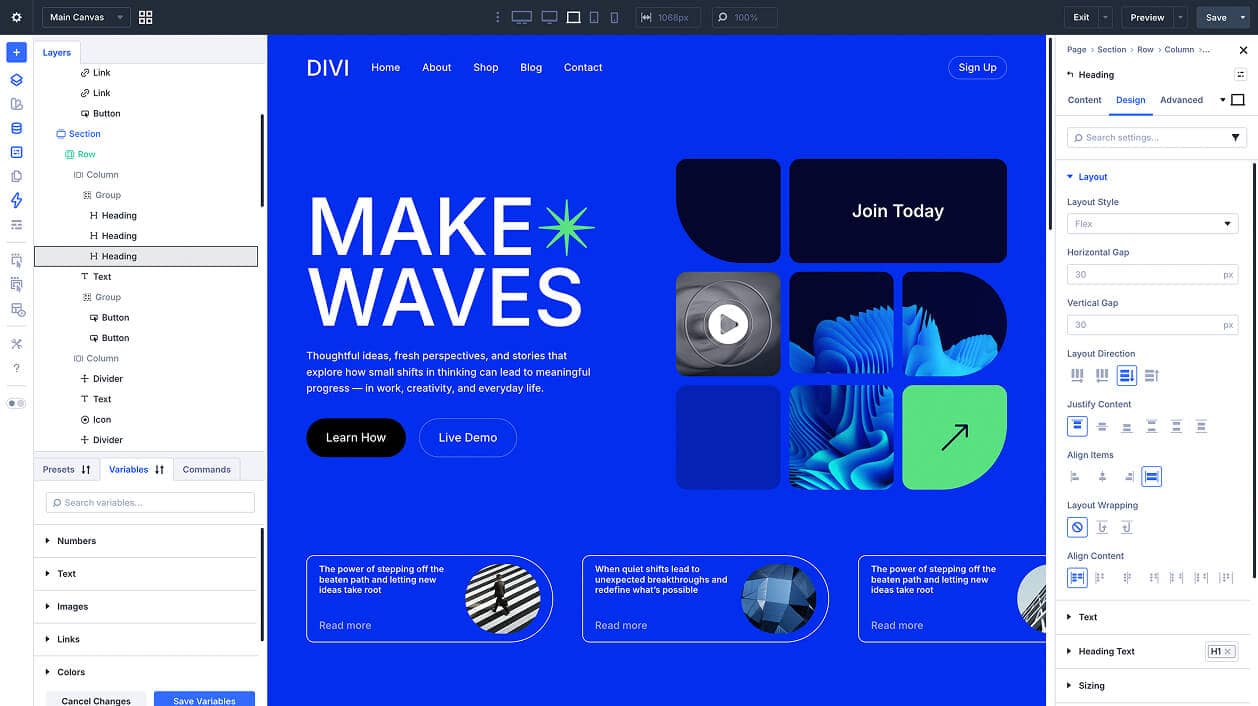
Why Divi 5 is a whole new era
If you tried Divi years ago and felt underwhelmed, please try it again. Divi 5 is not the same tool.
The speed alone is remarkable. Pages that used to feel sluggish to load and build are now fast on both ends: fast to work with in the builder, and fast for your clients when their site goes live. Elegant Themes has done serious work under the hood.
On top of that, Divi 5 introduced total responsive control, design system presets, and a UI that genuinely makes sense. The responsive editing has always been there, but now it’s actually enjoyable to use. You can set styles globally, override them locally, and know that everything will behave consistently across screen sizes.
I’ve been building websites for a decade and Divi 5 still surprised me. That doesn’t happen often.
Why does Divi work so well for graphic designers?
Most graphic designers already think visually. Divi speaks that language.
When you’re used to working in Canva, Illustrator, or InDesign, jumping into a code-heavy CMS feels like being handed a different instrument mid-song. Divi bridges that gap. The building blocks feel familiar: rows, columns, spacing, typography, colour. You’re thinking like a designer, not a developer.
That’s exactly why I built my entire course, Be The Boss of WordPress, around Divi. I wanted graphic designers to have a WordPress education that actually matched how they already think and work. Divi makes that possible.
Want to see more of the tools that support this kind of workflow? My useful tools page has everything in one place.
At a glance
⭐ Fave feature: The Theme Builder. You can create custom layouts for every part of your site, headers, footers, blog post templates, archive pages, all of it, visually. No developer needed, ever. And Divi 5 is seriously fast, both in the builder and on the front end.
👎 Dislikes: When you first open Divi, it can feel like a lot. So many panels, so many options. But once you know your way around, it becomes second nature. (That’s exactly why I created Be The Boss of WordPress.)
🔄 Replaces: Your WordPress theme, your page builder, and a handful of plugins you’d otherwise need to bolt on separately. Divi does it all in one tidy package.
📅 How long and how often: 10+ years, every single website I’ve built.
My verdict on Divi WordPress theme: 4.5/5
If I could only use one tool for the rest of my web design career, it would be this one. Not because it’s perfect (nothing is), but because it keeps up with me. The websites I built on Divi ten years ago, the ones I’m building now, and anything bigger I take on in future, all powered by Divi. It just never lets me down.
Try Divi free, no card required
Elegant Themes offers a proper free trial with no commitment and no credit card details required. Go have a play. You don’t need to build a real site to get a feel for it.
Heads up: the link below is an affiliate link. If you sign up, I may earn a small commission at no extra cost to you.
Already using Divi? Jump straight into Be The Boss of WordPress and learn how to get the most out of it, fast.
In My Stack: related editions
These are the other tools that sit alongside Divi in my day-to-day workflow:
- Wispr Flow: the AI dictation tool I use to write faster
- Setapp: the Mac app subscription that replaced 10+ tools
- TextSniper: the tiny Mac app that copies text from anywhere on your screen

FAQ: Divi for graphic designers
Do I need to know how to code to use Divi?
No. Divi is built specifically so you don’t need code. The visual builder handles layout, spacing, typography, colours, and responsiveness all through a drag-and-drop interface. That said, if you do know a little CSS, Divi gives you easy access to add it, which is a nice bonus as your confidence grows.
Is Divi good for beginners?
Yes, though it has a learning curve. The interface can feel overwhelming at first because there are so many options. The good news is that once you know where things live, building becomes fast and intuitive. Starting with a layout pack or template helps a lot in the early stages. See my Be The Boss of WordPress ecourse for complete training.
How does Divi compare to other WordPress page builders like Elementor or Bricks?
All three are capable builders, but Divi has a few distinct advantages: a flat lifetime pricing option, a strong community, and a theme builder that’s genuinely comprehensive. Elementor has a free version which makes it approachable, but the paid features quickly become necessary. Bricks is powerful and fast but skews more toward developers. For graphic designers who want a visual tool with real depth, Divi is my pick.
What is the Divi Theme Builder?
The Theme Builder lets you design every part of your WordPress site visually, not just the pages. That means custom headers, footers, blog post templates, archive pages, and WooCommerce templates, all built the same way you build a page. It’s one of Divi’s most powerful features and one that most people discover a little too late.
Is there a free trial for Divi?
Yes. Elegant Themes offers a free trial with no credit card required. You can explore the builder properly before committing to anything. It’s the best way to decide if it’s the right fit for your workflow.
Does Divi slow down your website?
Divi 5 specifically addressed performance. Earlier versions had a reputation for bloated code, but the Divi 5 rebuild focused heavily on speed, both in the builder experience and in front-end load times. Paired with good hosting and basic optimisation, Divi 5 sites perform well.
💌
Web Boss Weekly
Over 35,000 designers are already getting practical web design tips, and behind-the-scenes business goodness delivered straight to their inbox from me. Want in?
About the author
Emma Kate has spent over a decade teaching graphic designers to build WordPress websites for clients, confidently and without code. She runs the WP Mavens membership and the Consistent Clients Club, and is the co-founder of the Designer Boss Summit. Start with her self-paced courses or watch the free training.