
What does the “Untested with your version of WordPress” warning mean?
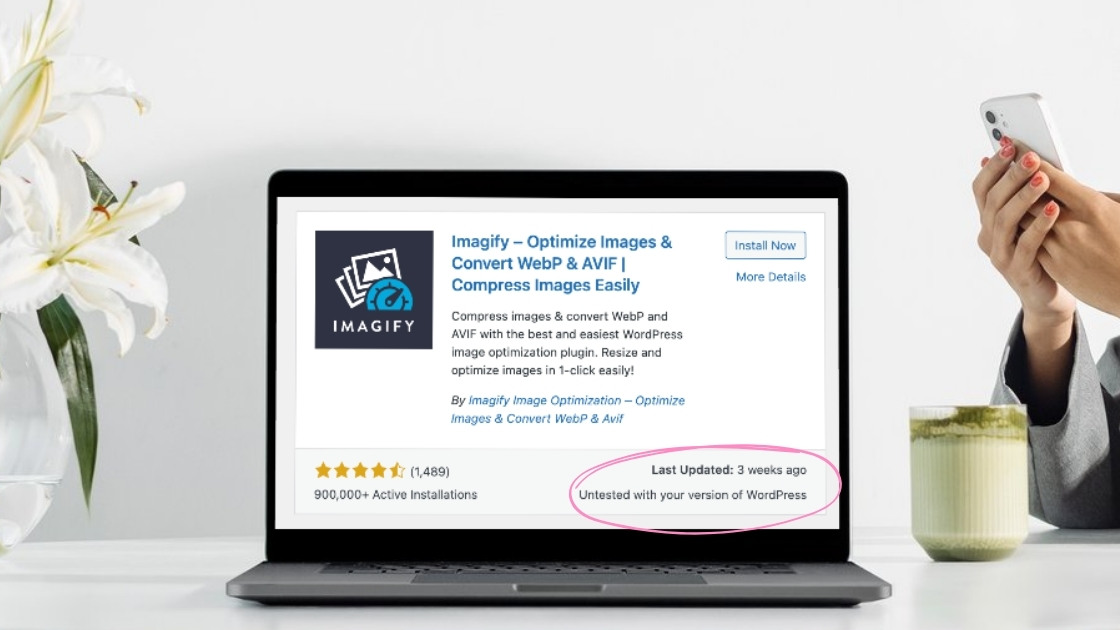
When you see the warning, “Untested with your version of WordPress” next to a plugin, it can spark a bit of worry. But it’s not always as scary as it sounds. This message simply means the plugin hasn’t been confirmed as fully compatible with your exact WordPress version – usually because the developer hasn’t updated or tested it recently. It’s more of a heads-up than a red flag.
Why This Warning Appears
This warning could also show up because WordPress recently updated. If plugin developers aren’t Johnny on the spot with their updates – even if they’re only delayed by a day or two – their plugin will get that warning.
Is It Really a Big Deal?
Here’s the good news: WordPress is a solid platform, and most plugins are built to be compatible across several versions. A plugin that’s untested isn’t automatically incompatible. Developers might just be slow on the update, or it’s been running smoothly without needing tweaks.
How to Handle “Untested” Plugins
What should you do? Check when the plugin was last updated and read through its recent reviews. If people are still using it without issues, it’s likely safe.
As an added safety precaution, you can optionally back up your site (as you always should!) and test the plugin in a staging environment to avoid unexpected surprises.
Conclusion: No Need to Panic
So, is this warning a big deal? Not really. With a little caution and a few checks, you’ll be adding features to your site without a hitch – no developer dramas needed.
Are you new to the world of WordPress? Here’s everything you should know if you’re considering learning WordPress well. The platform loved by millions! Or get my free training video all about using WordPress below! You’ll be a WordPress pro in no time. 😉
About the author
Hey! I'm Emma Kate — designer, web design educator, and co-founder of the Designer Boss Summit.
I believe you shouldn't need a developer (or a degree) to build stunning WordPress websites for your clients. Through my web design courses and mentoring, I've guided thousands of designers through my 9-step process to build sites they're genuinely proud of — and businesses that work on their terms.